
Notifications
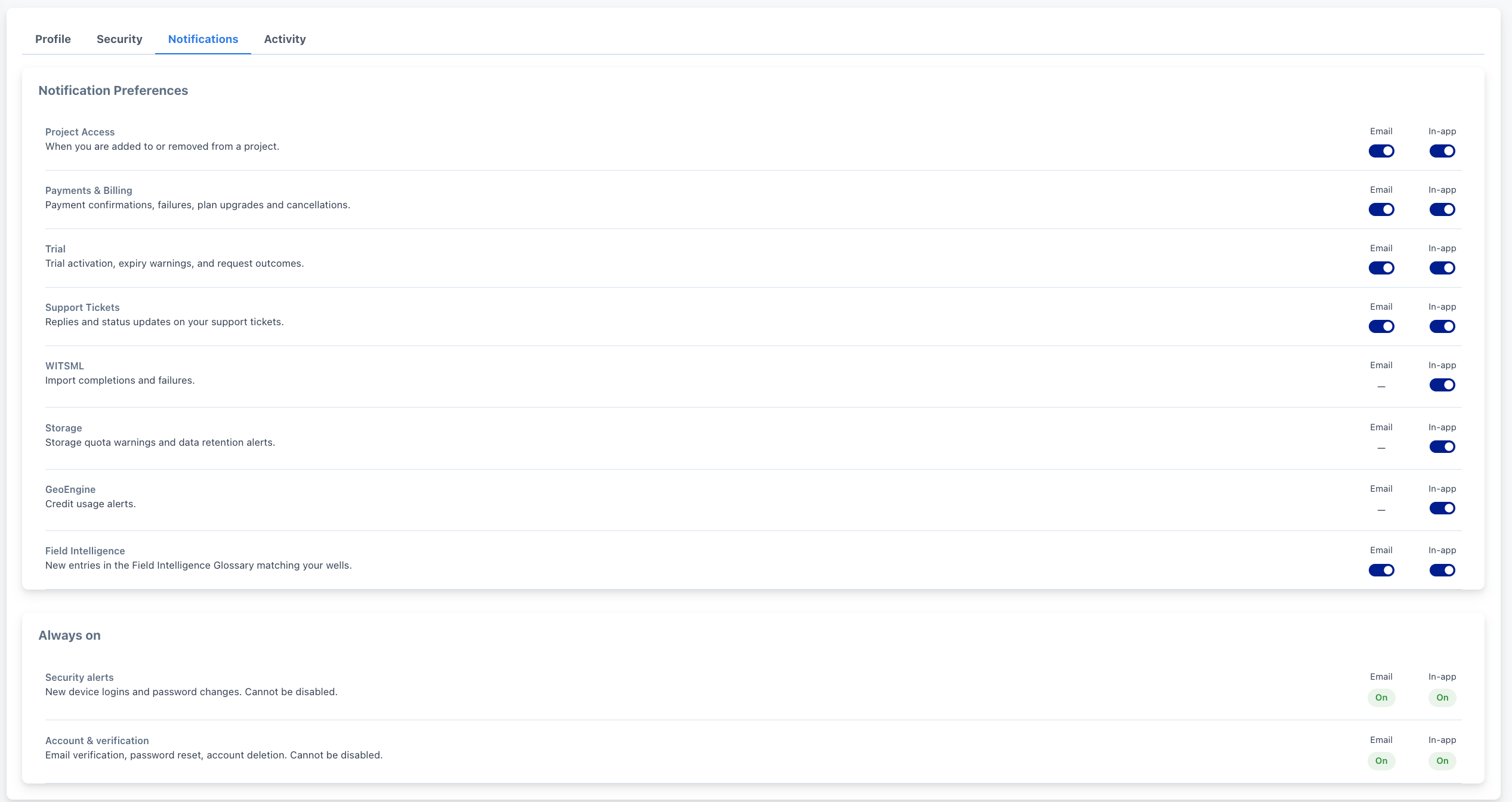
The Notifications tab controls which account events email you, notify you in-app, or both.
The Notifications tab controls which account events email you, notify you in-app, or both.
Opening the Notifications Tab
From Settings, click the Notifications tab (or go to /settings?tab=notifications).
📸 Screenshot 1: Full Settings page with the Notifications tab active.
Notification Preferences
One card with a row per category, each with two independent toggles, Email and In-app:
| Category | In-app | |
|---|---|---|
| Project Access | Yes | Yes |
| Payments & Billing | Yes | Yes |
| Trial | Yes | Yes |
| Support Tickets | Yes | Yes |
| WITSML | No | Yes |
| Storage | No | Yes |
| GeoEngine | No | Yes |
| Field Intelligence | Yes | Yes |
Click a toggle switch for that category/channel to change it. Changes save immediately (no separate Save button); a small spinner appears in the card header while saving.
📸 Screenshot 2: Notification Preferences card showing several toggles in both on/off states.
Always On
Below the preferences card, a second card lists two categories that cannot be disabled:
-
Security alerts: new device logins, password changes.
-
Account & verification: email verification, password reset, account deletion.